So this year I am using Raspberry Pis to teach a Fundamentals of Computer class. I wanted to document a few problems I ran into.
I successfully backed up the Raspberry Pi the first time by using the new option under Accessories called "SD Card Copier". But when I went to back it up again, it did not recognize the card! I tried so many things to get it to work. I thought it was the card reader, the SD card, and I tried formatting it, but that didn't work unless I used a specific program to reformat it.
Another colleague mentioned that it looked like it thought the cards were identical - and then I remember the option "new partition UUIDS". When I formatted the card the first time, I did not check the box "new partition UUIDS".
So I formatted the backup SD card that wasn't being recognized with the SD Memory Card Formatter found here: https://www.sdcard.org/downloads/formatter_4/. And then I ran the "SD Card Copier" again, this time selecting "new partition UUIDS" and it worked to back up the card again the next time! Why couldn't I find this information anywhere?! :)
Sunday, September 17, 2017

Thursday, March 30, 2017
Technology or Learning?
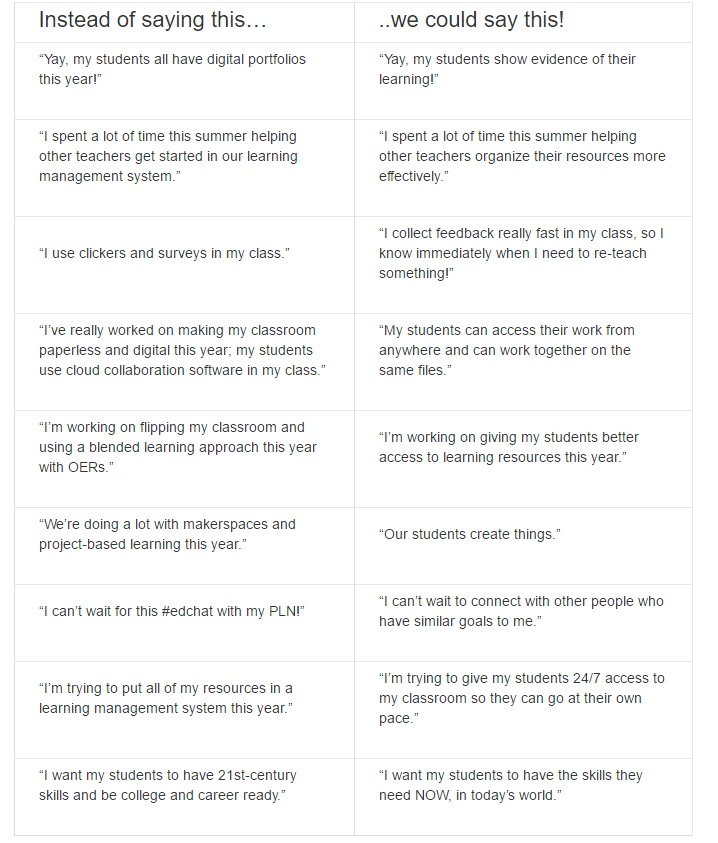
I found this to be a great resource of information from the Ed Tech Coaching blog Words Matter: Are You Talking About Technology, or are You Talking About Learning?:

Sunday, February 19, 2017

Monday, February 6, 2017

Tuesday, January 31, 2017
Free Technology for Teachers: 5 Good Elementary School Activities from the Smith...
Free Technology for Teachers: 5 Good Elementary School Activities from the Smith...: The Smithsonian offers wonderful online resources for students of all ages. The Smithsonian's Learning Lab lets teachers create collec...
Subscribe to:
Posts (Atom)