Tuesday, August 14, 2018
Windows 10 August 2018 update causing wifi problems
My computer recently did an update to Windows 10, and in the process the wifi stopped working. After several attempts to fix it, I found that if you go to Network Connections, right click on the Wifi network connection, and choose Properties. Then select the Internet Protocol Version 4 and select properties. Then select both to be "obtain automatically". Do the same with the Internet Protocol Version 6. Hopefully this fixes things for you!

Tuesday, November 14, 2017
Document Studio - The Google Sheets Add-on You've Been Waiting For
Document Studio - The Google Sheets Add-on You've Been Waiting For: Document Studio is a new Google Sheets Add-on developed by Amit Agarwal . Document Studio will create documents based on the data that you ...
Sunday, September 17, 2017
Raspberry Pi: Can't start the desktop with new user
I created a new user with the Raspberry Pi, and tried to type "Startx" to start the desktop, but nothing worked! FINALLY found out that I couldn't choose the option to "boot to CLI" and still run the desktop.
Raspberry Pi: Problems recognizing card when backing up with "SD Card Copier"
So this year I am using Raspberry Pis to teach a Fundamentals of Computer class. I wanted to document a few problems I ran into.
I successfully backed up the Raspberry Pi the first time by using the new option under Accessories called "SD Card Copier". But when I went to back it up again, it did not recognize the card! I tried so many things to get it to work. I thought it was the card reader, the SD card, and I tried formatting it, but that didn't work unless I used a specific program to reformat it.
Another colleague mentioned that it looked like it thought the cards were identical - and then I remember the option "new partition UUIDS". When I formatted the card the first time, I did not check the box "new partition UUIDS".
So I formatted the backup SD card that wasn't being recognized with the SD Memory Card Formatter found here: https://www.sdcard.org/downloads/formatter_4/. And then I ran the "SD Card Copier" again, this time selecting "new partition UUIDS" and it worked to back up the card again the next time! Why couldn't I find this information anywhere?! :)
I successfully backed up the Raspberry Pi the first time by using the new option under Accessories called "SD Card Copier". But when I went to back it up again, it did not recognize the card! I tried so many things to get it to work. I thought it was the card reader, the SD card, and I tried formatting it, but that didn't work unless I used a specific program to reformat it.
Another colleague mentioned that it looked like it thought the cards were identical - and then I remember the option "new partition UUIDS". When I formatted the card the first time, I did not check the box "new partition UUIDS".
So I formatted the backup SD card that wasn't being recognized with the SD Memory Card Formatter found here: https://www.sdcard.org/downloads/formatter_4/. And then I ran the "SD Card Copier" again, this time selecting "new partition UUIDS" and it worked to back up the card again the next time! Why couldn't I find this information anywhere?! :)
Thursday, March 30, 2017
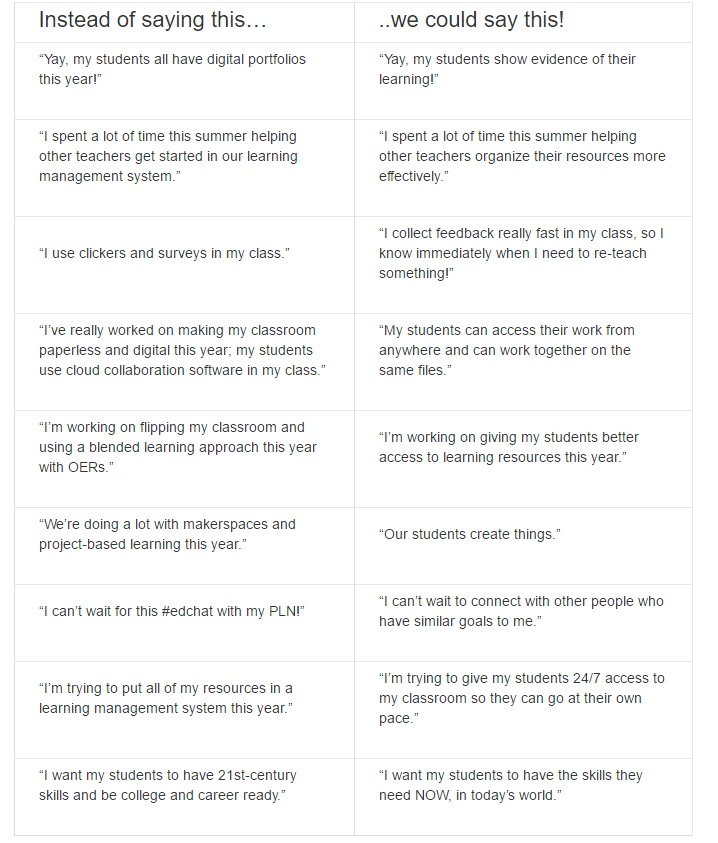
Technology or Learning?
I found this to be a great resource of information from the Ed Tech Coaching blog Words Matter: Are You Talking About Technology, or are You Talking About Learning?:

Sunday, February 19, 2017

Monday, February 6, 2017

Tuesday, January 31, 2017
Free Technology for Teachers: 5 Good Elementary School Activities from the Smith...
Free Technology for Teachers: 5 Good Elementary School Activities from the Smith...: The Smithsonian offers wonderful online resources for students of all ages. The Smithsonian's Learning Lab lets teachers create collec...
Monday, November 21, 2016
Free Technology for Teachers: How to Create a Google Earth Tour
Free Technology for Teachers: How to Create a Google Earth Tour: Google Earth can be used for all kinds of lessons in math (see Real World Math ), science (try these resources ), and language arts (try Goo...
Monday, September 26, 2016

Monday, September 5, 2016
ISTE 2016
I learned so much at ISTE, that I created a Google sheet called "Must have apps and websites". Check it out!
Sunday, September 4, 2016

Friday, July 29, 2016
Google Sites Resources
 At the last Google Summit I also attended a workshop by Kyle. His resource can be found here:
https://sites.google.com/site/pacehandouts/google-sites.
This includes information on how to create a site as well as examples.
He also mentioned that you can have a template site created that other teachers can use. He also puts a disclaimer in the footer of each site.
I am copying the links found at https://sites.google.com/site/pacehandouts/google-sites
below:
Big list of teacher examples!
Thursday, July 28, 2016
Taking minutes using Google Docs and Approval Workflows (Autocrat & FormMule)
This was based on a session by Henry Thiele at the Great Plains Google Summit. His information was found here: https://goo.gl/rGGFBn and titled "Google Apps for School Admins". Here are the takeaways:
Minutes from Meetings: You should run meeting for an entire year from a single google doc. This document would contain a table of contents at the top that lists the dates of the meetings.
The team is now managing agenda. You aren't. Prep agenda. Email collaborators and have them update it. Send a week ahead. Make sure to send copy to yourself. Can grab text out of table of contents and email it out to the group. That includes the links.
Minutes from Meetings: You should run meeting for an entire year from a single google doc. This document would contain a table of contents at the top that lists the dates of the meetings.
The team is now managing agenda. You aren't. Prep agenda. Email collaborators and have them update it. Send a week ahead. Make sure to send copy to yourself. Can grab text out of table of contents and email it out to the group. That includes the links.
Example:
July 1
Last meeting tasks (put table) put in heading two
Old Business
New Business
Tasks
[Return to Top] link at the end of each meeting.
FERPA concern? No - See http://deunters.blogspot.com/2016/07/killing-fud-and-dispelling-myths-around_28.html for more details.
Emails: You be only one paragraph with list of links to information. Need to think about this since my emails are usually pretty long! Good idea for newsletters that go out. This way if something changes, you just change the information in the link. Add new information at the top.
Building Approval Workflows taken from https://goo.gl/mjGuA1 This was example of a teacher who wanted to put in Absence Request using a form, it would automatically get sent to the supervisor, with prefilled field, and the supervisor could approve or reject.
Steps and Resources
Use Autocrat (Documents) or FormMule (email) to send out confirmation of approval
More about the two add-ons:
https://www.youtube.com/watch?v=zOOb7YxVNKI
Steps and Resources
Resources and examples will be added during the demonstration
Step 1:
Create your Google Form for requests and associated spreadsheet
(first name, last name, email address, supervisor email, date requested off) Absence Request Form
Step 2:
Step 3:
Get pre-populated URL from Approval Form
Step 4:
Use Autocrat (Documents) or FormMule (email) to send out pre-populated approval form link
Step 5:
Use Autocrat (Documents) or FormMule (email) to send out confirmation of approval
More about the two add-ons:
Google Photos upload taking up all bandwidth

"Killing the FUD and Dispelling the Myths around GAFE"
 |
| http://technocation.blogspot.com |
then they tell you "you can't put anything FERPA related out there."
I attended Henry Thiele's presentation a couple years ago on dispelling those myths. I thought I would post a couple links here for future reference:
http://www.gafeadmin.com/blog/killingthefudanddispellingthemythsaroundgafe
https://docs.google.com/presentation/d/1CmyVh5N2agPXs20zGnXu509kr6ycL8bvzW5TZ0Vcbng/htmlpresent?hl=en
According to him, you can put anything on the Google docs, and it is safer than having it on our local servers.
I also talked with someone from the Lincoln Public Schools with the same view, and they shared this link: http://home.lps.org/training/2012/08/22/student-data-privacy-in-google-apps/
Google's Reply:
http://googleforeducation.blogspot.com/2015/12/the-facts-about-student-data-privacy-in.html
20 Time Project (Google Summit)

Takeaways from the keynote speaker, Kevin Brookhouser, author of "The 20time Project":
www.20time.org. We want students to solve those wicked problems, and think outside of the box. One game he mentioned that helps students do this is "Limbo" - a game where boy crosses river and has to think out of box. He talked about having student brainstorm about bad ideas http://www.20time.org/the-bad-idea-factory/
He talked about Daniel Pink's book "Drive"
http://www.ted.com/talks/dan_pink_on_motivation
And the three ways to motivate are:
- Autonomy - urge to direct our own lives
- Mastery - desire to get better aand better at something that matters
- Purpose - the yearning to do what we do in the service in something larger than ourselves
Play is learning
Has students come up with what they are going to do. Has them create a proposal - audience, needs, deliverables, product, reality check, conclusion. Has them blog each week of what they are doing, where they are going.
A couple other good books and Youtubes: Stop Stealing Dreams: Seth Godin
https://www.youtube.com/watch?v=sXpbONjV1Jc
- What is school for?
- Go do something interesting!
Adam Grant's book - Originals
Subscribe to:
Posts (Atom)